
Conditional logic is useful when a form needs to ask different questions depending on a visitor’s previous answers. Instead of showing every possible field at once, you can display additional fields only when they are relevant.
Elzo Forms includes conditional field visibility in the free WordPress plugin. You can show or hide fields based on form values without writing custom JavaScript or upgrading just to use basic conditional logic.
View Elzo Forms on WordPress.org
What is conditional logic in a WordPress form?
Conditional logic means that the form changes according to information the visitor enters or selects.
For example, a project request form might start with this question:
What do you need help with?
- Website development
- Website maintenance
- Something else
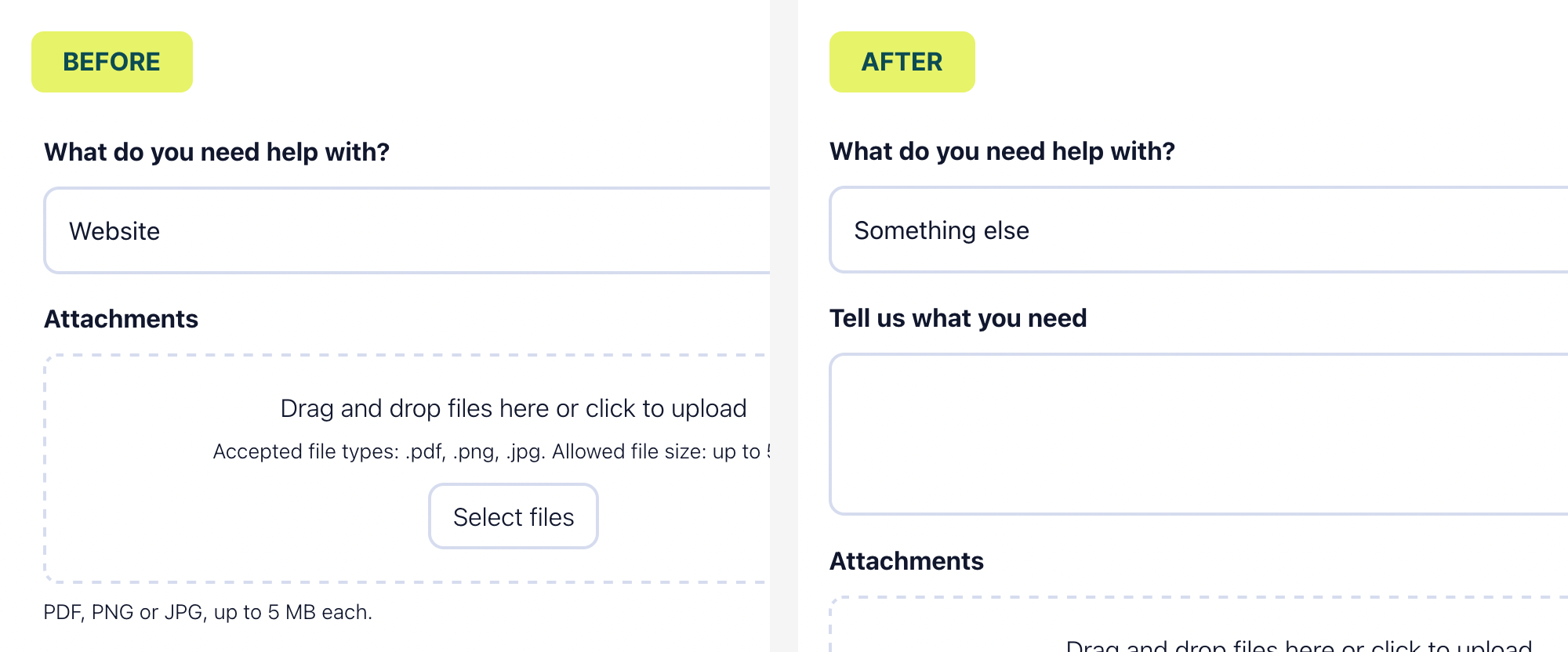
If the visitor selects Something else, the form can reveal an additional field:
Tell us what you need
Visitors choosing one of the other options do not need to see or complete that field. This is especially useful when a form has optional questions that apply only to certain users.
How to create a conditional field in Elzo Forms
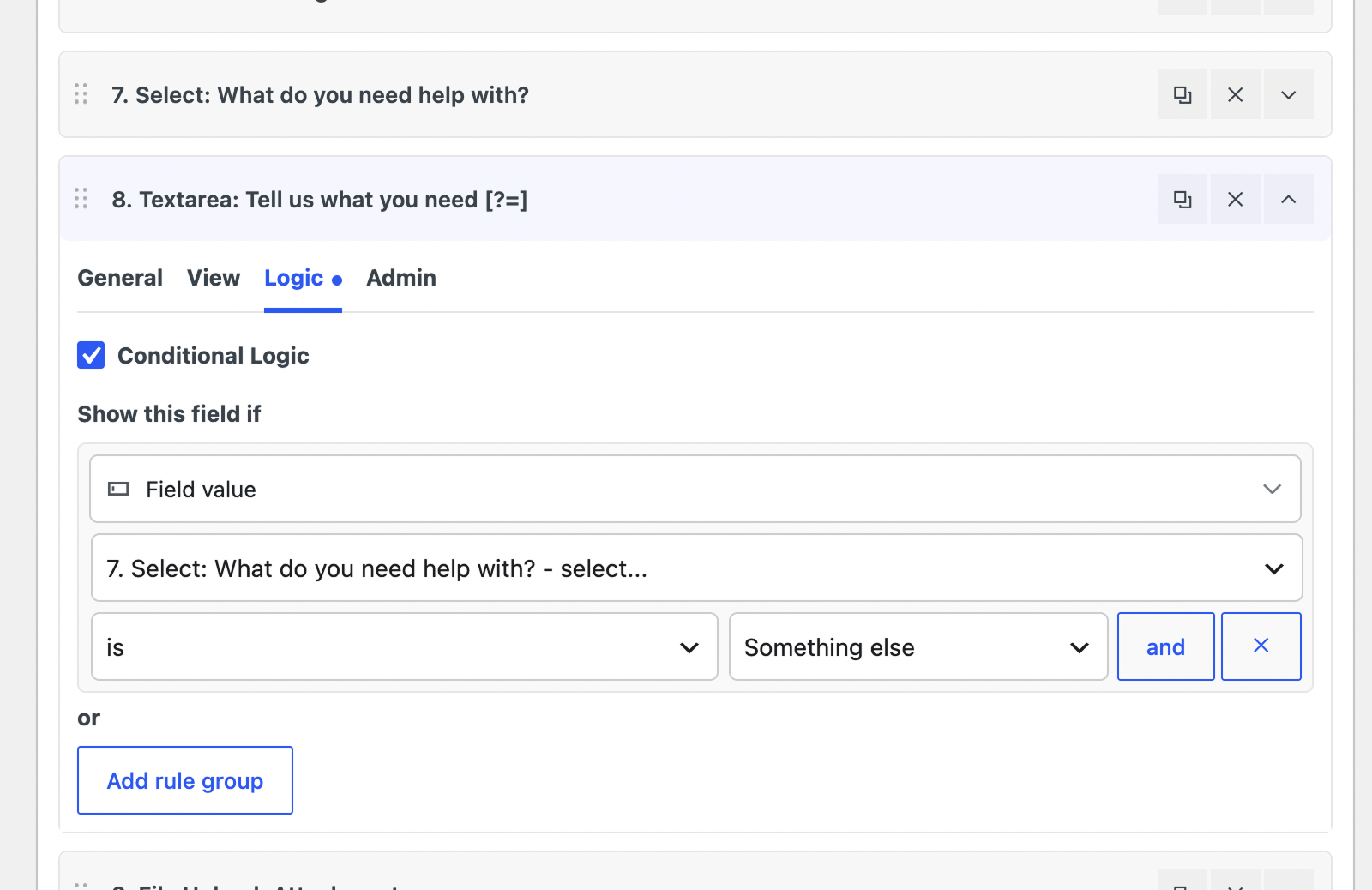
First, build the form normally in the Elzo Forms visual builder. Then open the field that should appear conditionally and configure its visibility rule.
For the example above, the condition would be:
Show this field when → What do you need help with? → equals → Something else
After saving the form, add it to a page with the native Elzo Form block or a shortcode.
The conditional behavior is handled by the plugin, so you do not need to add custom JavaScript to the page.
Where conditional fields are useful
Conditional logic can keep larger forms easier to understand because visitors only see questions that apply to them. Common examples include:
- Quote forms: ask different questions depending on the selected service.
- Support forms: request technical details only for certain problem types.
- Job applications: show additional questions for a particular position or experience level.
- Registration forms: display extra information for specific attendee types or selections.
- Contact forms: ask for more details only when a particular subject is selected.
This can be more practical than creating several separate forms for closely related use cases.
Conditional logic in Elzo Forms Free
Standard conditional field visibility is included in the free version of Elzo Forms. A field can respond to values entered in other fields, and conditional visibility can also use supported visitor or page context.
This means a typical form can contain optional sections, follow-up questions, or different paths without requiring a paid version simply to show or hide a field.
Other features included in the free plugin
Elzo Forms Free also includes features that are often useful alongside conditional logic:
- multi-step forms;
- single and multiple file uploads;
- stored form submissions inside WordPress;
- email notifications;
- form styling controls;
- built-in spam protection;
- a native Gutenberg block and shortcode support.
Form submissions are processed and stored on your WordPress site by default. An Elzo account or external form service is not required to create and use forms.
Free conditional logic vs. advanced workflows
For many forms, showing or hiding fields based on another field value is all that is needed, and this functionality is available in Elzo Forms Free.
Elzo Forms PRO is intended for more advanced workflows. It adds additional condition types such as User, URL, Cookie, and Date and Time conditions, along with automation actions, webhooks, redirects, reusable automations, and other post-submission workflow tools.
You do not need PRO simply to create a field that appears when a visitor selects a particular answer.
Can you use conditional logic in WordPress for free?
Yes. If you need a free WordPress form plugin with conditional logic, Elzo Forms can create conditional fields directly inside WordPress without custom code.
You can start with a simple rule such as showing an additional field when a particular option is selected, then combine conditional fields with multi-step forms, file uploads, stored submissions, and other free form-building features as needed.
Install Elzo Forms from the official WordPress Plugin Directory